
Export the schedule you are looking at
Download the tasks on screen, with or without crew numbers, in the phase selection you have applied.
Last updated
Export uses the schedule as it is filtered right now: the jobs you have left visible, and the phases you have applied. It does not go back and include tasks you hid.
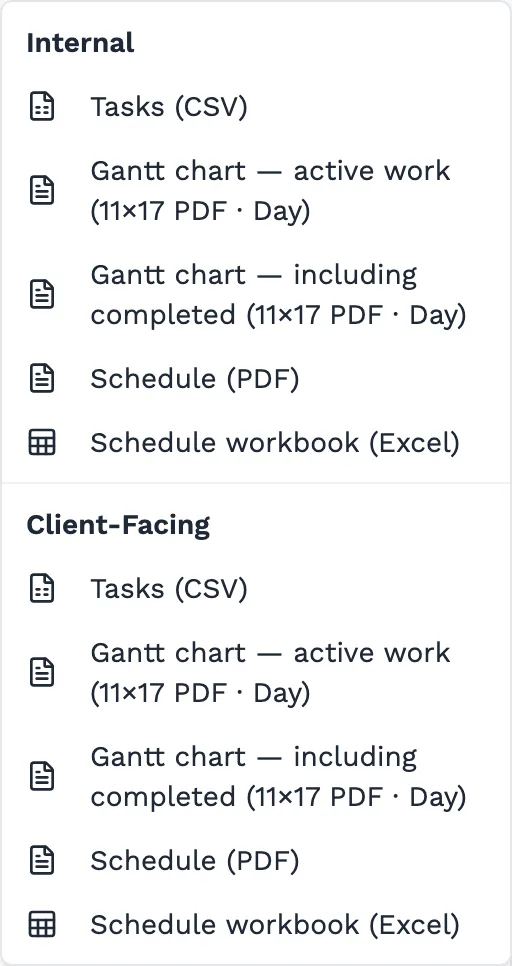
Two audiences share that same set of tasks. Internal keeps crew and labour. Client-Facing leaves those columns out, and keeps the jobs, phases, activities and bars. The dates and counts are calculated the same way in both.
Who can do this
- Owners, admins and members can export.
- Viewers do not see Export. A read-only role can look at the schedule and cannot take the programme out of the workspace.
What will be refused
- CSV is on every plan. The Gantt PDF and the Excel workbook are Pro. On Starter those rows are locked and point at an upgrade.
- A Client-Facing file is safe to send outside the company only because crew and labour are omitted. Check you picked Client-Facing before you attach it.
- If a phase filter is on, the file matches that filter, and the header names the phases. Clear the filter first when the recipient needs the whole job.
Set the view you want on paper
Choose Classic, List or Swimlanes, and the zoom (Day, Week, Month, or Full, which prints as a year). Hide any jobs you do not want in the file. Apply a phase filter if you want only part of the work.
Open Export
The Export button is on the schedule. It is hidden for viewers.
Choose the audience
Internal includes crew size, man-days and labour hours. Client-Facing drops those fields so the sheet has no blank staffing columns, and keeps the schedule.
Choose the file
Tasks (CSV) is the spreadsheet of rows. Gantt chart downloads an 11×17 landscape PDF at the zoom you are on — active work, or including completed. The Excel workbook is the compiled report.
Check the phases line
When a filter is applied, the file names the phases it includes. The rows should match what you still see on the schedule.
Worth knowing
- The printable Gantt repeats the task names and the date band on every sheet, so one page still reads on its own.
- Manpower and Calendar have their own exports. The Internal and Client-Facing split is the schedule and project export.
Next steps
Still stuck?
Tell us the job and the dates involved and we'll usually answer without a call.
Or email Support@tradeflowplanner.com